FinanceLoan
Loan Summary
One row per employee that has loans - what they borrowed, what is still to repay and how much was recovered.
Finance > Loan > Loan Summary (Per-employee loan outstanding balance and repayment status) shows, for every employee who has loans, how much they borrowed, repaid and still owe. It needs the view permission of Loan Management.
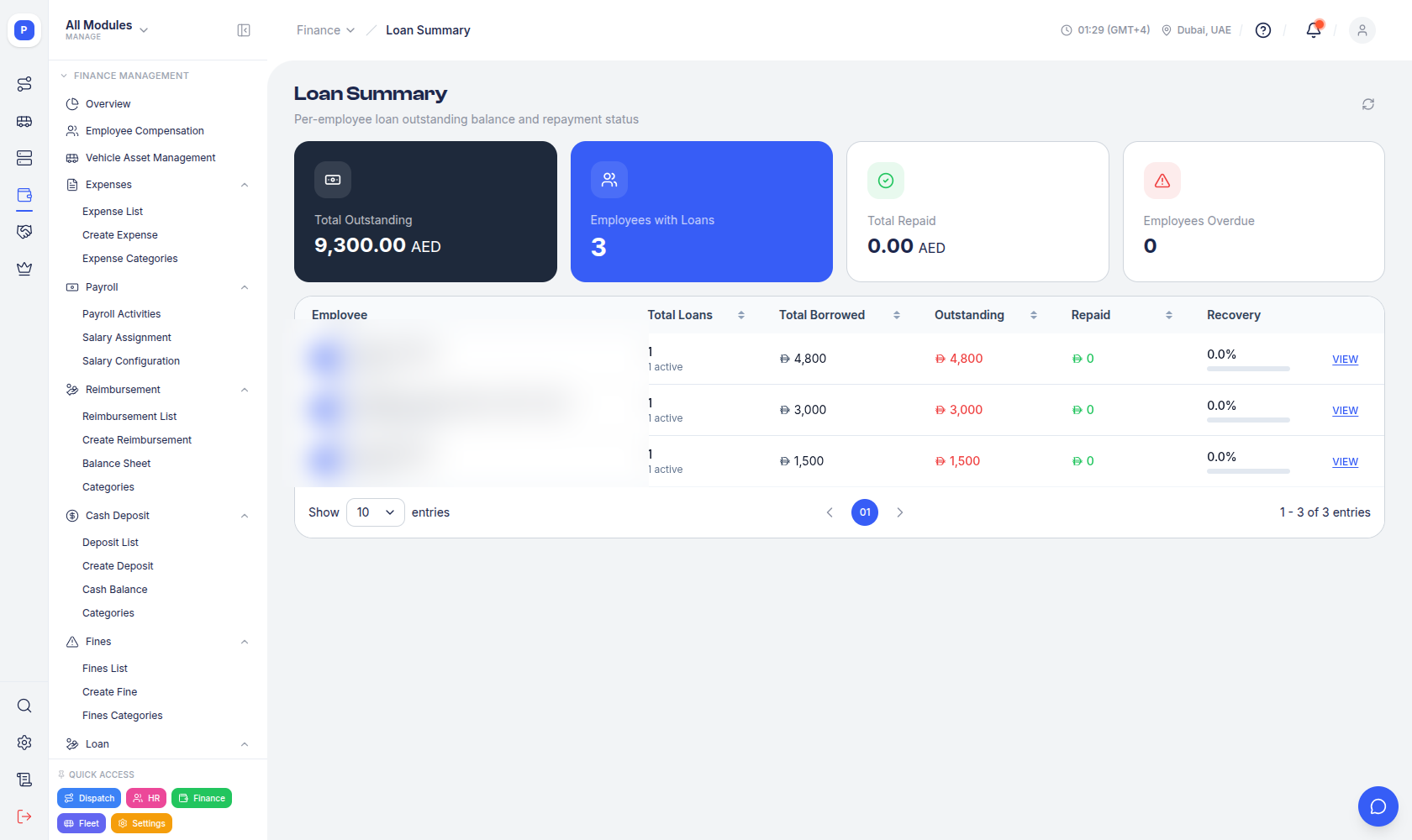
The cards
The four cards are worked out by the server over all employees (not only the rows on the page):
| Card | Meaning |
|---|---|
| Total Outstanding | What all employees still owe |
| Employees with Loans | How many employees have at least one loan |
| Total Repaid | The total already repaid |
| Employees Overdue | How many employees have an Active loan whose expected end date has already passed |
The table
| Column | Meaning |
|---|---|
| Employee | The employee (name and number) |
| Total Loans | How many loans the employee has, with how many of them are active below it (1 active) |
| Total Borrowed | The sum of the loan amounts |
| Outstanding | What is still to repay |
| Repaid | What was repaid |
| Recovery | Repaid divided by what was borrowed, as a percentage with a bar |
Only loans that are Active, Paid, Overdue or Defaulted are counted: pending, rejected and cancelled loans are not part of the summary. The list is paged (10 rows by default).
Click a row, or View at the end of it, to open the Loan list filtered on that employee. An empty list says No employees with loans found.