Document Generator
Generate the company's formal letters as PDF - vehicle registration and ownership transfer NOCs, court / MOHRE / Al Adheed claims and debt acknowledgement letters - and keep every one of them in a list.
Finance > Document Generator produces letters on the company letterhead and keeps each one as a record you can preview, download, edit again or delete. It has four menu items, each with its own list and form.
| Menu | Letter | Used for |
|---|---|---|
| Vehicle Registration | NOC for vehicle registration, in Arabic, addressed to the RTA | Registering a vehicle |
| Vehicle Ownership Transfer | NOC for a vehicle ownership transfer, in Arabic, addressed to the RTA | Transferring a vehicle to a buyer |
| Court/MOHRE/Al Adheed Docs | Statement of claim (Dubai Labor Court, MOHRE) or a claim letter (Al Adheed), with evidence annexes | A claim against an employee for unpaid loans or traffic fines |
| Debt Acknowledgement Letter | A statement of what an employee owes, for the employee to sign | Confirming an outstanding debt |
How every page works
- The list shows the letters created so far, with a search box and filters. The row menu (the ... button) has Preview, Download, Edit and Delete.
- Add opens the form. Generate checks the fields, saves the record and builds the PDF, which opens in a preview window with a Download button. Closing the preview returns to the list.
- Edit opens the same form with the saved values. Save & Generate saves the changes and builds the PDF again.
- Delete asks for a confirmation and removes the record from the list (the record is kept in the database, marked as deleted).
The PDF is built by the server, so Generate can take a few seconds.
Permissions
All four pages use the Document Generator permission: view to open the lists, preview and download, add to generate a new letter, edit to change one (and to change the letter settings), delete to delete. Buttons you may not use are not shown.
Letter settings
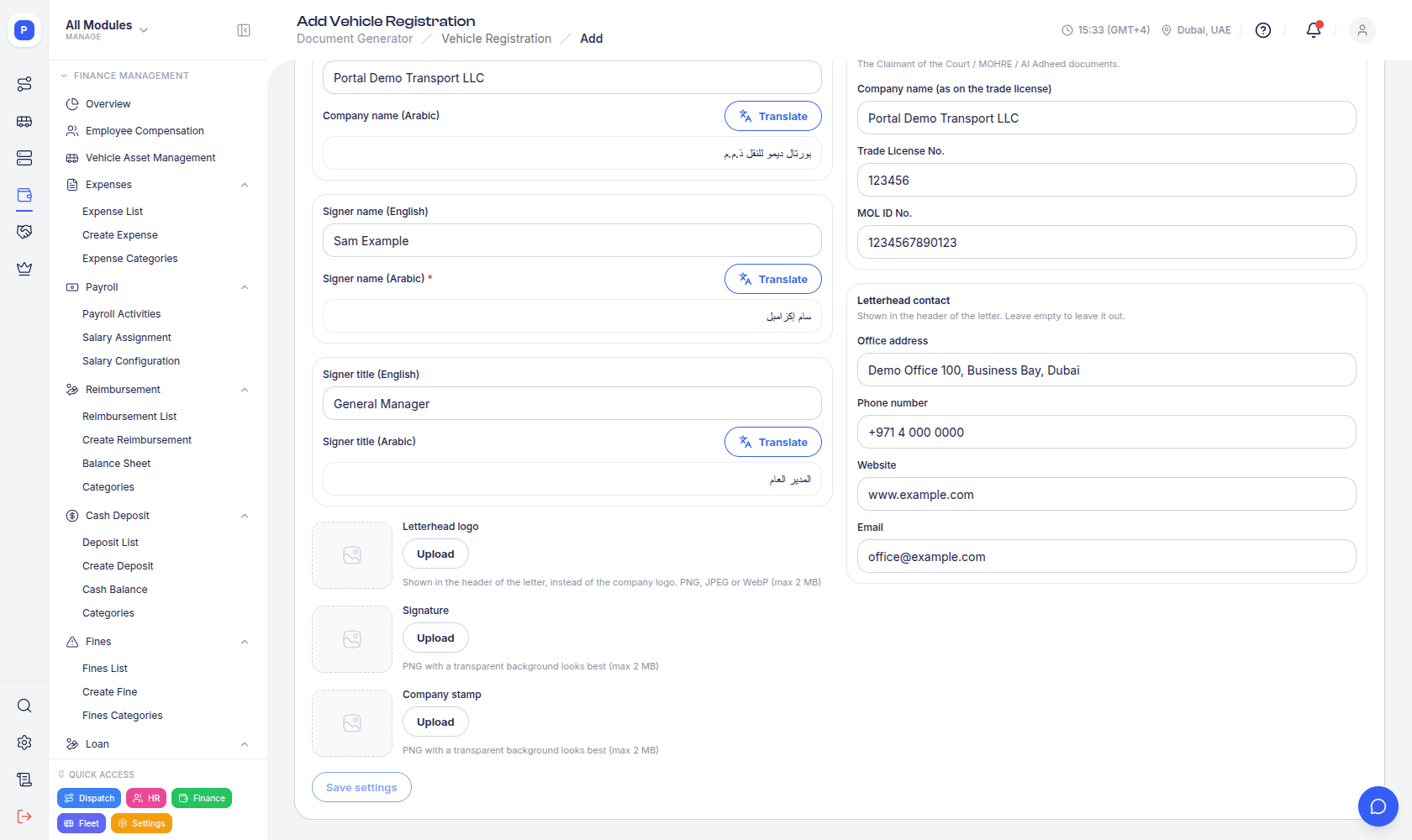
Under every form (and used by every letter) is the Letter settings panel: "Saved once for the company and reused by every letter". It holds:
- Company names and signer: the company name and the signer's name and title, in English and in Arabic. The Arabic name of the signer is required before a letter can be generated; the form says so when it is missing. A Translate button next to each Arabic field suggests the Arabic text from the English one; the result is marked Standard Arabic for this title or Auto-translated by the model, please check the spelling before saving. If the translation is not configured for the company you type the Arabic by hand.
- Company legal details: the company name as on the trade license, the Trade License No. and the MOL ID No. (the claimant of the Court / MOHRE / Al Adheed documents).
- Letterhead contact: office address, phone, website and e-mail, shown in the header of the letter (left empty they are left out).
- Images: a Letterhead logo, the Signature and the Company stamp, each with Upload / Replace and Remove. PNG, JPEG or WebP, up to 2 MB (a PNG with a transparent background looks best for the signature and the stamp). The signer's name and title also exist in English, next to the Arabic fields.
Save settings stores the panel. Only a person with the edit permission can change it; others see the values read-only. Generating a letter also saves any change you made in the panel.
The letterhead shows the company logo unless you upload a Letterhead logo here. If the logo cannot be loaded, the letter shows the company name instead and the form says so.